
 (and pretty much every Gingerbread Android) allows you to choose which option is shown and with ease you can flick between the two.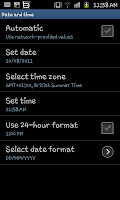
By opening the settings screen (press "menu" then settin gs youll be able to find the options for "Date and Time" which youll need to click on. The Date and time menu will look something like the screen shot to the left of this paragraph and as you can see near the bottom is a tick box with the option "Use 24-hour format". By checking the box youll notice that the clock in the top corner
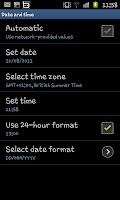 will do one or two things. Firstly the "AM" (or "PM") will be dropped from the clock (see the screen shot to the right with out the AM). Secondly if you are beyond 12:59 you will notice that the clock is showing in the 24 hour format (for example 16:55 is 4:55 PM).
Although this is a tiny feature that most wont use at all its a nice addition and allows you that little bit of extra choice to personalise your phones display.

No comments:
Post a Comment